
 MeiFiles
Verify checksums
Compute the MD5, SHA-1, SHA-256 and SHA-512 checksums of files, and check them against a checksum you paste.
Check that a download or a copy is complete and unchanged. MeiFiles computes MD5, SHA-1, SHA-256 and SHA-512 in one pass, so you do not have to know which one the publisher used.
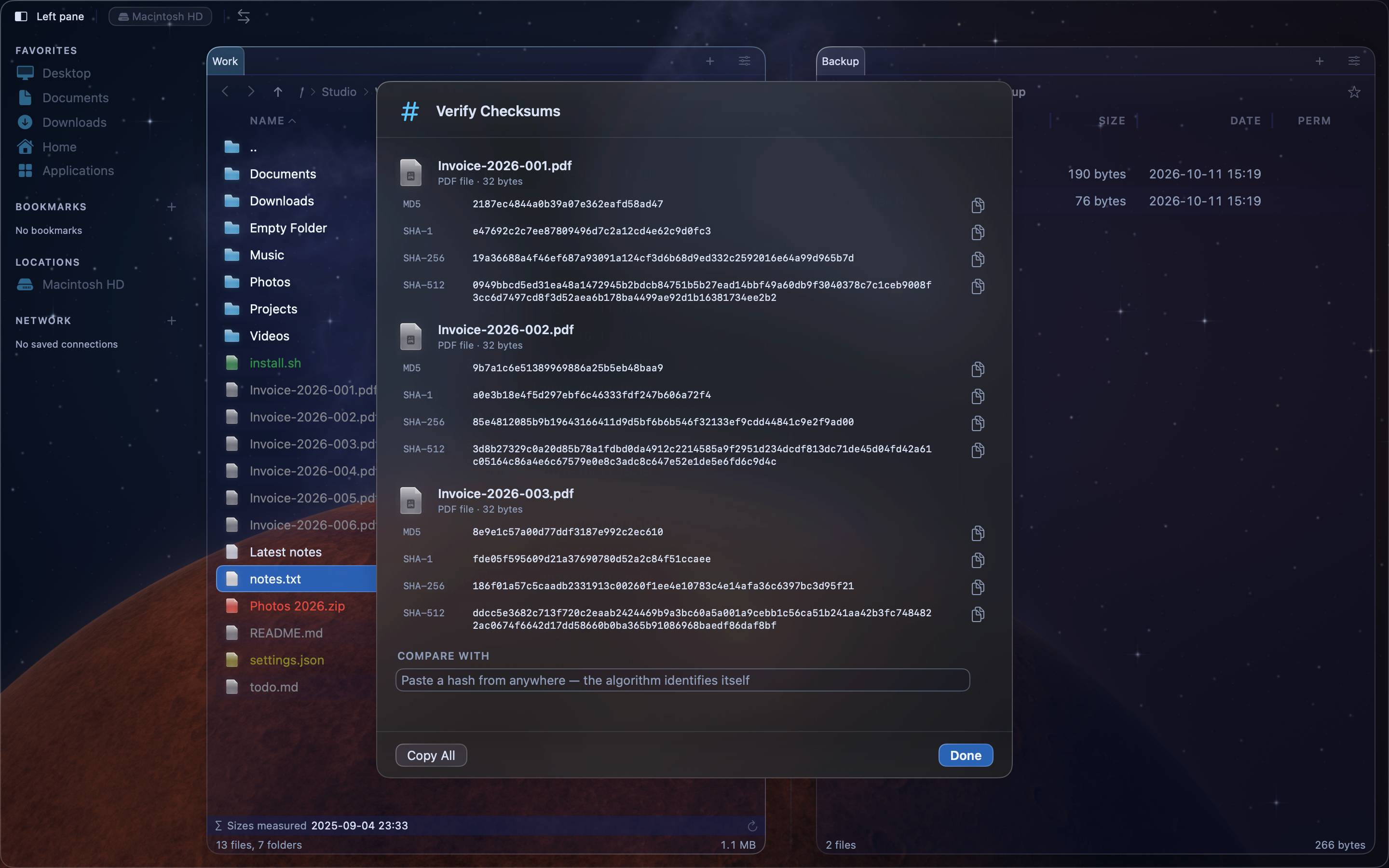
Compute checksums#
- Select one or more files.
- Press Shift-Command-K (
⇧⌘K), or choose File > Verify Checksums…. The command is also in the context menu.
Each file shows a progress bar, then its four checksums. Folders are skipped.
Check against a published checksum#
- Copy the checksum from the website or the file that came with the download.
- Paste it into the Compare with: field.
The matching row is highlighted, and a line under the field names the algorithm and the file, for example "SHA-256 matches Photos 2026.zip". If nothing matches, it says "No checksum matches what you pasted". Capital letters and spaces before or after the pasted text do not matter.
Copy checksums#
- Click the copy button at the end of a row to copy that one checksum.
- Click Copy All to copy every checksum of every file as text, one file after another.
Click Done when you are finished. Click Cancel to stop the computation and close the sheet.